
Website Design Guide
Design decisions behind the new Williams Air Solutions site — what they're based on and what each one does for the business.
Design decisions behind the new Williams Air Solutions site — what they're based on and what each one does for the business.
Current site
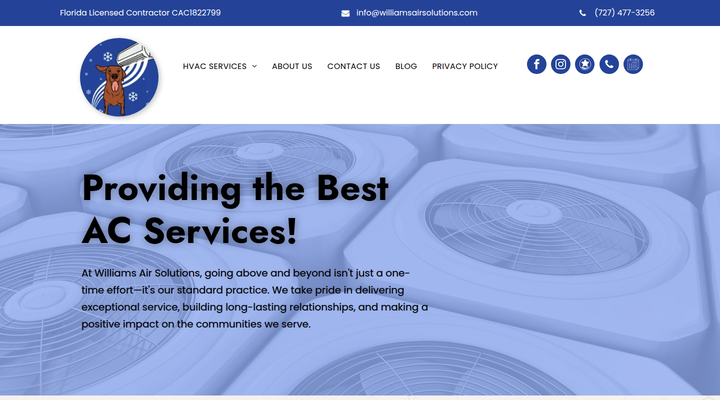
New site
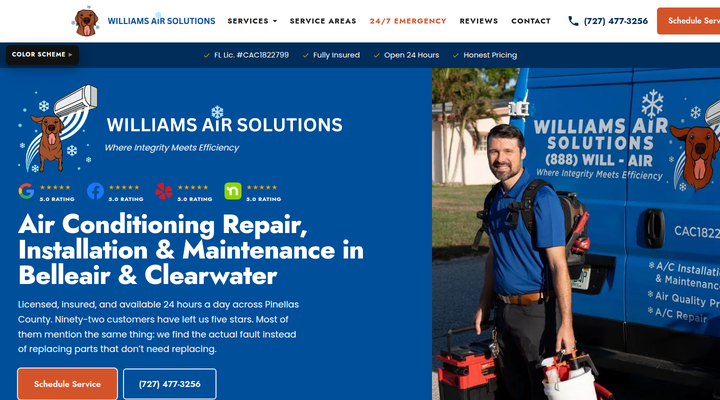
Current site
New site
The diagnostic found 22 priority issues on the current Williams site. Here is what was found and what the new site does about each one.
| What the diagnostic found | What the new site does |
|---|---|
| 8 main pages, 24 city pages (not indexed by Google), and 235 blog posts (not ranking). The page count isn't the issue. The issue is that the pages that exist aren't doing their job. | 80 pages built to rank. 7 service pages, 38 unique city pages, 34 original blog posts. Plus 15 standard pages (about, FAQ, contact, financing, reviews, etc.). |
| No CTA above the fold. Stock hero photo. Generic headline. | Dual CTA in every hero. Schedule Service + phone number visible immediately. Real van photo. Headline addresses the customer's problem. |
| 24 city pages, all noindexed by Google (templated content). | 38 city pages with unique content. Real neighborhoods, housing stock, and climate factors. No templates. |
| 235 blog posts. Not ranking for core local searches despite the volume. | 34 original posts to start, targeting high-intent symptom searches with direct paths to service pages. More can be added over time. |
| Service pages at 400-600 words. | Written to the market median of 1,500-1,700 words. Each service page matches what's ranking in the area. |
| No chat, no after-hours website lead capture. 35-60% of home service inquiries happen after hours. | Bear chatbot on every page. 62 topics, proactive greeting, page-specific messages. Available 24/7. |
| No exit intent recovery. Visitors leave with no second chance. | Exit popup on service pages. "Real person. Honest answers. We'll call you." Recovers 2.8-3.9% of leaving visitors. |
| About page with no story, no team photos, no bios. | About page built from real interview content. The business story, the team, the approach. Bear has their own section. |
| WordPress/Duda with plugins, third-party scripts, and hosting fees. | Static HTML. No CMS, no database, no plugins. Sub-second load times. Zero hosting cost beyond domain renewal. |
| Brand colors picked generically. No connection to actual visual identity. | Colors extracted from real van photos. Two palettes built from pixel sampling under different lighting conditions. |
| Copy opens with service descriptions. Fewer than 5% of competitors lead with the customer's problem. | Every page opens with the problem. Copy themes pulled from the 97 real customer reviews. |
| No structured data. No rich snippets in search results. | Schema markup on service pages. Structured data for business info, services, FAQ, and breadcrumbs. |
Different phone numbers throughout the site and GBP listings. The new site uses one verified number on every page with click-to-call on mobile, so every tap reaches the right line.
No call-to-action on 6 of 7 pages. Visitors had to navigate to the Contact page to take any action. Research shows a visible CTA on every page lifts conversion 25-40%. The new site has Schedule Service and the phone number in the hero, mid-page, and bottom of every service page, plus a sticky call bar on mobile.
24 city pages invisible to Google. Each unique city page is a separate opportunity to rank for "[service] + [city]" searches. 38 pages means 38 chances to appear when someone in those cities searches for AC help.
No "website" lead capture after hours. 35-60% of home service inquiries happen after business hours (ServiceTitan, industry research). The current site offers no way for after-hours website visitors to engage beyond a contact form on one page. The new site has Bear greeting visitors on every page, an exit popup on service pages, and click-to-call that opens the dialer directly.
Hero section. The first thing a visitor sees drives more conversion decisions than any other part of the page. The current site opens with a stock photo and generic headline. The new site opens with the real van photo, 5.0 rating across four platforms, dual CTAs, and the license and insurance trust line, all visible before scrolling.
Reviews not visible on homepage. 97 five-star reviews are the strongest trust signal Williams has. The new site puts them front and center in a full-width carousel on the homepage, not buried on a separate page.
The current Williams site has 8 main pages, 24 city pages that aren't indexed by Google, and 235 blog posts that aren't ranking. The page count isn't the gap. The gap is that the pages that exist aren't doing their job. The top-performing HVAC sites have fewer total pages but each one ranks and converts independently. That isn't vanity. Google ranks pages, not sites. A single homepage cannot rank for "AC repair Clearwater" and "mini split installation Belleair" and "emergency AC repair" at the same time, because those are different searches with different intent.
Dedicated service pages convert at 15-25%, compared to 3-5% for a homepage trying to cover everything. That's the single biggest reason the new site is built as separate pages.
The decision: A multi-page hub-and-spoke architecture. The homepage is a front door that previews each service and links to its own page. Every service page is built to rank and convert independently.
Every city in the service area has its own page with unique content written specifically for that community. Not templates with the city name swapped in. Google's 2025 Spam Update specifically targets templated location pages. The new city pages mention real neighborhoods, local housing stock, and specific climate factors.
About, Contact, Financing, Reviews, FAQ, Specials, Maintenance Plan, Privacy Policy, Accessibility Statement, blog index, and 404.
The site's blue isn't a generic pick. It was extracted from real photographs of the Williams van using pixel sampling across multiple photos taken under different lighting conditions.
Each palette has its own CTA color, dark shade, and light tint, all derived from the source blue using split-complementary warm color harmony. The result is a color system that looks like the van, not like a template.
The wordmark includes the Williams snowflake icon and is optically aligned with the navigation text. Visually balanced so the text reads on the same line as the nav links. Navigation is set at 15px uppercase for clarity at a glance.
The Google reviews section runs edge-to-edge across the full page width with no boxed container. The cards float in open space, reading as a first-class section rather than an embedded widget. The scroll pauses on hover.
There are no decorative animations, no autoplay videos, no pop-ups on page load, no parallax scrolling, and no elements that move for the sake of moving. This is intentional, not an oversight.
The goal is a site that feels like a real business, not a template someone bought and filled in.
The research analyzed 537 pages across 32 HVAC companies ranking in Florida and other states. The findings shaped every sentence on the site.
Most HVAC websites open flat. 50-72% of competitor pages open with a generic description. Fewer than 5% open with the customer's problem. These pages open with the problem. That means visitors immediately see themselves in the page instead of scrolling past a description to find relevance.
The 97 Williams reviews were analyzed for patterns. The themes that come up most are honesty, clear explanations, and not replacing parts unnecessarily. Those themes are in the copy because real customers said them.
No overpromising. The copy avoids "free estimates," "no obligation," "guaranteed," and "risk-free." These were removed to avoid overpromising and potential liability concerns, and they stay out.
The voice: Direct, honest, specific. Written like someone who understands the trade is explaining it to someone who doesn't.
Every page title carries a service term plus a city name, because 48% of competitor titles that rank do exactly this. "Near me" appears nowhere. Google matches proximity through the Business Profile and schema markup.
Every page has one H1 heading with the primary keyword and city. H2 subheadings carry location modifiers where the content is climate-specific (e.g., "What a diagnostic visit looks like in Belleair"). The heading hierarchy follows H1 → H2 → H3 with no skipped levels — this structure is what Google and AI search engines use to understand page topics and generate featured answers.
Every page includes JSON-LD structured data. The site carries LocalBusiness + HVACBusiness schema with the full address, phone, hours, aggregate rating (97 reviews, 5.0), and 26 service area cities. Service pages add Service schema. FAQ pages add FAQPage schema. Every inner page has BreadcrumbList schema. This powers rich snippets in search results: star ratings, FAQ dropdowns, business hours, and direct phone links.
Pages with valid structured data earn 30-82% higher click-through rates than standard listings, and AI search engines (Google AI Overviews, ChatGPT, Perplexity) cite pages with well-formed schema far more often than those without.
City names throughout the site link to their service area pages. Every blog post links to a relevant service page. Every service page cross-links to related services. This network tells Google which pages are connected and passes ranking authority from one page to the next.
The business name, address, and phone number appear in the same format on every page — in the footer, in the schema markup, and in the Google Maps embed. NAP consistency across the website and Google Business Profile is a direct local ranking factor, accounting for 7% of local search ranking signals.
The market median for ranking HVAC service pages is 1,500-1,700 words, based on analysis of 537 pages across 32 HVAC companies in Florida and other states. The service pages are written to that range. The 34 blog posts target symptom questions and how-to topics that competitors don't cover — 6-22% of competitors address symptom searches, so these posts face less competition.
Conversion rate by channel (industry research)
Sources: PipelineOn, Invoca, Astucia 2026, Oscar Chat
Every page has two clear actions: Schedule Service and Call (727) 477-3256. These appear in the hero, mid-page, and bottom. Phone converts at ~40% close rate vs ~20% for forms, so the number is never more than a glance away.
License number, insurance status, review count, and 24-hour availability appear near every action button. Trust badges near action fields lift conversion 15-30% for less-known brands (cross-industry research).
Bear doesn't just sit and wait. After 7 seconds, a speech bubble appears with a page-specific message. Proactive chat invitations convert 40% higher than passive icons, and invited visitors are 6x more likely to convert (Freshworks, industry research). Shows once per session.
When a desktop visitor moves toward the close button, a popup offers a callback: "Real person. Honest answers. We'll call you." Exit popups recover 2.8-3.9% of leaving visitors. Fires once per session, only on service and contact pages.
Three prices are published: $94 new-customer maintenance (regular rate $188), $140 diagnostic (credited toward the repair if you proceed), and free replacement estimates. The maintenance plan tiers (Silver, Gold, Platinum) are on their own page with a comparison table. Every price is stated before anyone is dispatched.
These figures were pulled from the current Jobber booking page. All prices on the site can be updated — they live in one data file, so a price change is a single edit that updates every page at once.
A Google Maps embed showing the Williams location appears in the footer of every page and on the contact page. This reinforces the Name-Address-Phone (NAP) signal that Google uses for local ranking. The embed references the business by name, not just coordinates.
73-78% of HVAC searches happen on mobile (WebTonic, HVAC SEO Agency, CallRail). Phone calls account for 60-70% of all HVAC conversions, and phone leads convert at 46% — six times higher than web forms. Every mobile design decision was made to shorten the path from search to phone call.
75% of mobile users interact with one thumb. The natural easy-reach zone is the bottom of the screen. The site puts three actions there: Call Now, Schedule Service, and Menu. Research shows bottom-placed CTAs get 10-20% more taps than top-placed ones, and bottom tab bars outperform top hamburger menus by 30-50% in feature discovery.
The header slides away when scrolling down (reading content) and slides back when scrolling up (looking for navigation). This gives the full viewport to content while keeping the call bar — the highest-converting element — always visible.
On mobile, the contact form shows three fields: name, phone, and service needed. The desktop form has five. Research shows reducing form fields from 8 to 4 produces a 30-50% increase in completion (Formstack, Venture Harbour). The tech who calls back asks the rest.
Every phone number on the site is tappable. One tap opens the dialer with the number pre-filled. 88% of searches for local businesses on mobile result in a call or visit within 24 hours (Meta).
All buttons exceed the 48px minimum touch target. The call bar is 60px. The site loads in under a second because it's static HTML — no database, no CMS, no third-party scripts to wait for. Sites under 3 seconds convert at 5.2%; sites over 6 seconds drop to 1.8%.
Sites under 3 seconds convert at 5.2%. Sites over 6 seconds convert at 1.8%.
The site is static HTML. No WordPress, no page builder, no database. The entire site weighs 5.3MB. Zero third-party scripts. This means:
Williams owns the files outright. No account, no subscription, no lock-in. It's HTML, CSS, and images. Move it anywhere, hand it to anyone, keep it running at zero cost beyond domain renewal.
Businesses that blog generate 67% more leads per month. The 34 posts target three clusters:
"Why is my AC running but not cooling?" Only 6-22% of competitors cover these. Each post answers plainly, then links to AC Repair.
Filter sizing, drain line clearing, thawing a frozen coil. Zero of the 32 HVAC companies analyzed cover most of these topics.
"Should you close vents in rooms you don't use?" (No.) Counter-commercial posts that build trust by telling people what the industry usually won't.
The website is a folder of files.
No CMS login, no plugin updates, no theme license, no hosting contract.

Bear is the Williams Air Solutions family dog: an 11-year-old, 110-lb chocolate lab who hangs around the shop, rides in the van, and has their own following on the company's social media. He's on the logo, on every vehicle wrap, and now he's on the website too.
The chatbot was built around Bear's real personality. His animated avatar uses the same chocolate brown as the logo, sampled from the actual pixels. His tongue pants. He calls the technicians "my humans" and jokes about not having thumbs.
Bear handles 62 topics and steers visitors toward calling or booking. Every answer is pre-written from actual Williams service info, real review themes, and confirmed facts. No AI generating answers means no risk of wrong information, no token costs, and no monthly API fees. Bear runs for free, indefinitely.
Bear is proactive. After 7 seconds on any page, a speech bubble appears with a message tailored to that page. A notification dot stays on his icon until the visitor clicks. Research: proactive chat invitations produce 3x more engagement than a passive icon.
Open the site and click Bear in the bottom-right corner to try these:
Next upgrade: in-chat booking. Bear asks for name, phone, service type, and preferred time directly in the conversation, then submits it to the scheduling system. No page redirect, no form to fill out. Backend connections to email, Jobber, or a CRM can be added without changing anything the visitor sees.
The AI option. Bear can be upgraded to an AI-powered conversation engine that handles freeform questions, follow-ups, and complex scenarios. The tradeoff: AI costs per conversation (token usage), requires monitoring for accuracy, and creates a security surface that needs managing. The current version is the foundation. It can expand with more pre-written topics, connect to backend systems, or move to AI, depending on what the business needs and when it makes sense to invest.
When someone is about to leave on desktop, a popup appears:
"Real person. Honest answers. We'll call you."
Drop your number. We'll reach out within an hour.
A simple name-and-phone form with Bear's face in the corner. No guilt trips, no fake urgency. Just an honest offer.
Exit popups recover 2.8-3.9% of abandoning visitors on average. For HVAC where a single job is $200-600+, even a few extra leads per month pays for itself. Fires once per session, only on service and contact pages. Skipped on mobile.
The copy was chosen based on 2025-2026 popup conversion research. A/B test variants are logged for future optimization.
This isn't just good practice. It means the site works for everyone who visits it.
The site is ready to deploy. Some things can only happen once it's live on the real domain with access to business accounts. Here is the roadmap in three phases.
The copy on the site was built from real reviews, interview notes, and confirmed facts. But nobody can replicate the real voice of the business from secondhand sources alone. These questions fill that gap. There are no wrong answers. Short, honest responses are better than polished ones.
1. What does Williams do that most HVAC companies in the area won't do, or refuse to do?
2. What do customers tell their friends about Williams? If you've overheard it or been told, what do they say?
3. What's the one thing every prospect should know about Williams before they call anyone else?
4. After a job is done, what do customers say most often? Not the review language, the actual words at the door or on the phone.
5. What's the best compliment a customer has given you?
6. What's the most common complaint or frustration customers had with the company they used before Williams?
7. Describe a job that didn't go as planned and how the team handled it.
8. Has a customer ever almost gone with a competitor but chose Williams at the last minute? What changed their mind?
9. What's the most common situation where a customer calls expecting to need a full replacement, but it turns out to be a simple fix?
10. How would you describe the way you talk to homeowners about their AC?
11. Are there any words or phrases the business should never use? Anything that sounds fake, oversells, or doesn't feel right?
12. Is there an HVAC company, any size or location, that you think sets the standard for how things should be done?
13. What's the #1 reason someone hesitates to book a service call? What are they worried about?
14. What do homeowners commonly get wrong about HVAC? What do they assume that isn't true?
15. When a customer is comparing quotes, what do most competitors leave out that Williams includes?
16. If you had 30 seconds to tell someone why they should call Williams instead of the company running ads on every channel, what would you say?
17. What usually makes a customer decide to go with Williams?
18. Why did you start this company? What's the short version of how Williams Air Solutions came to exist?
19. What's something about how the business operates behind the scenes that you wish customers could see?
20. What do you want Williams Air Solutions to be known for five years from now?
These answers feed directly into the website copy, the chatbot, and any future marketing materials. The more specific and honest the responses, the more the site sounds like Williams and not like a template.
A few things to know about this preview version.
Top-left corner of every page. A collapsible "Color Scheme" button with two options: Shadow Blue (#004F9B) from the darker van photo and Light Blue (#11A6FE) from the brighter photos. Pick whichever feels right.
The contact form and exit popup form are not connected to a backend yet. They'll be wired to the CRM/scheduling system before launch.
The site currently uses (727) 477-3256 on every page. This should match whatever number is on the Google Business Profile listing. If a different number should be used, flag it and it will be updated everywhere.
Pricing on the site reflects the current Jobber booking page: $94 new-customer maintenance (regular $188), $140 diagnostic, free replacement estimates. Maintenance plan tiers (Silver $149, Gold $249, Platinum $399) and the 21-point checklist are listed as shown. Confirm exact plan tier values and checklist details before going live.
Real Williams job photos wherever possible. A few stock placeholders remain. Before/after shots from jobs are ideal replacements.
Take a look at the site on a phone and on a computer. Read the service pages for accuracy. Flag anything that's wrong, missing, or doesn't sound right. Nobody knows the business better than the people running it.