
What Local Services Ads Are
Local Services Ads (LSAs) are Google's pay-per-lead advertising product for service businesses. They appear at the very top of Google Search and Google Maps results — above traditional Google Ads, above organic results, and above the local map pack.
The key differences from other advertising:
- Pay-per-lead, not pay-per-click. Charges only happen when a customer makes contact — a phone call, a message, or a booking request. Browsing the ad, reading the profile, or viewing photos costs nothing.
- Trust badge. LSA businesses display a Google Verified badge (formerly called Google Guaranteed) indicating that the business has passed background checks, license verification, and insurance verification. Roughly 42% of searchers say they are more likely to choose a verified provider over one without the badge.
- No keywords to manage. LSAs don't use keyword bidding. Google matches the ad to searches based on the business category, job types enabled, and service area configured in the profile.
- Position. On mobile — where the majority of "AC repair near me" and emergency HVAC searches happen — LSAs occupy positions 1-3, the first thing a searcher sees.
What LSAs look like in search results
When someone searches for an HVAC service, the results page is laid out in this order:
- Local Services Ads (top) — A row of business cards showing company name, star rating, number of reviews, years in business, city, and a blue Google Verified checkmark. Clicking one calls the business directly or opens a message form.
- Google Ads (PPC) — Traditional text ads with headlines and descriptions.
- Map pack — Three local businesses shown on a map, pulled from Google Business Profile (GBP).
- Organic results — Standard website listings ranked by SEO.
LSAs are the first thing a searcher sees. Everything else — paid ads, maps, organic — appears below them.
Here is what LSA results look like for AC repair searches in the Clearwater and Belleair area (September 2026). Click either image to view full size:
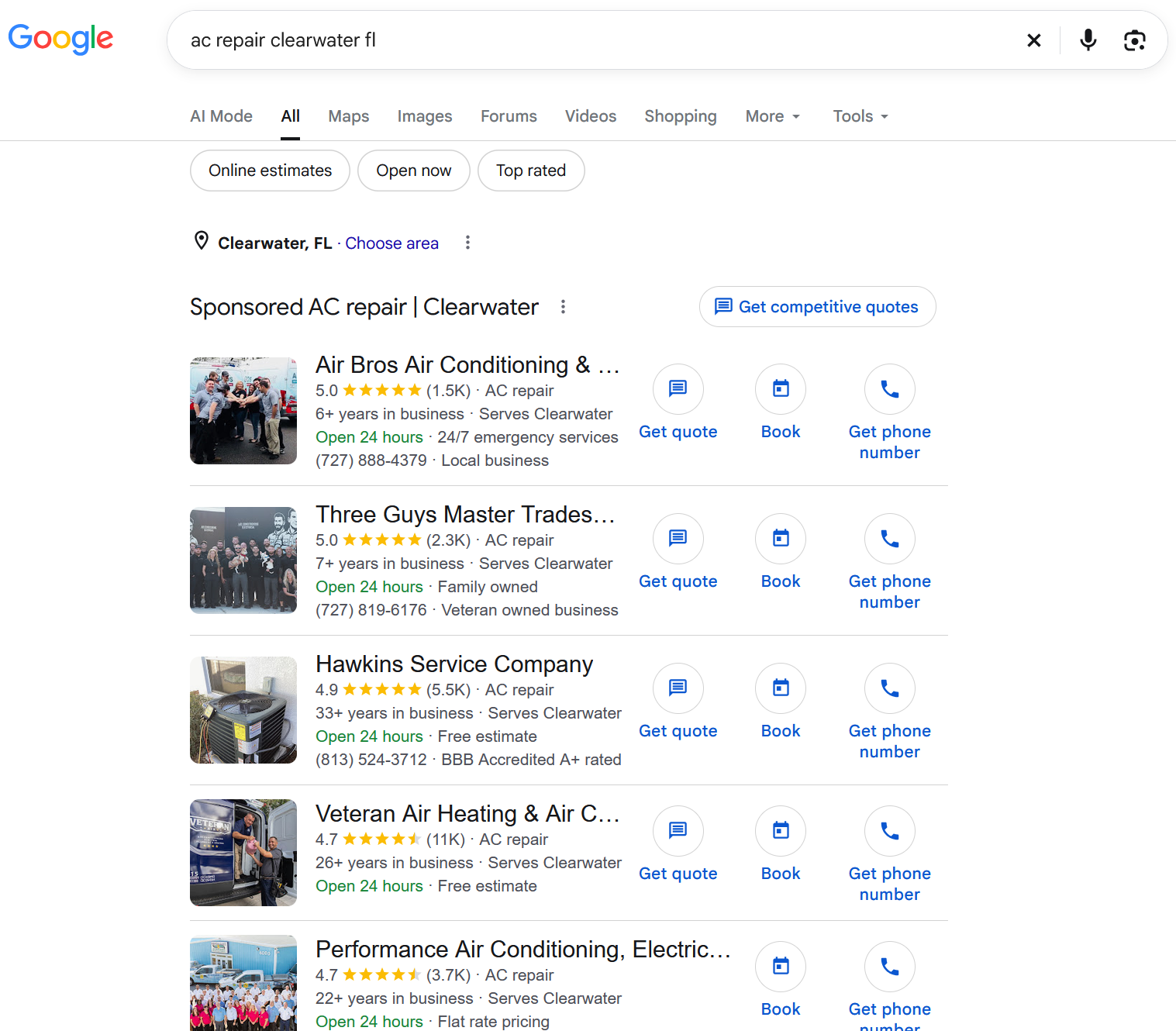
Clearwater, FL
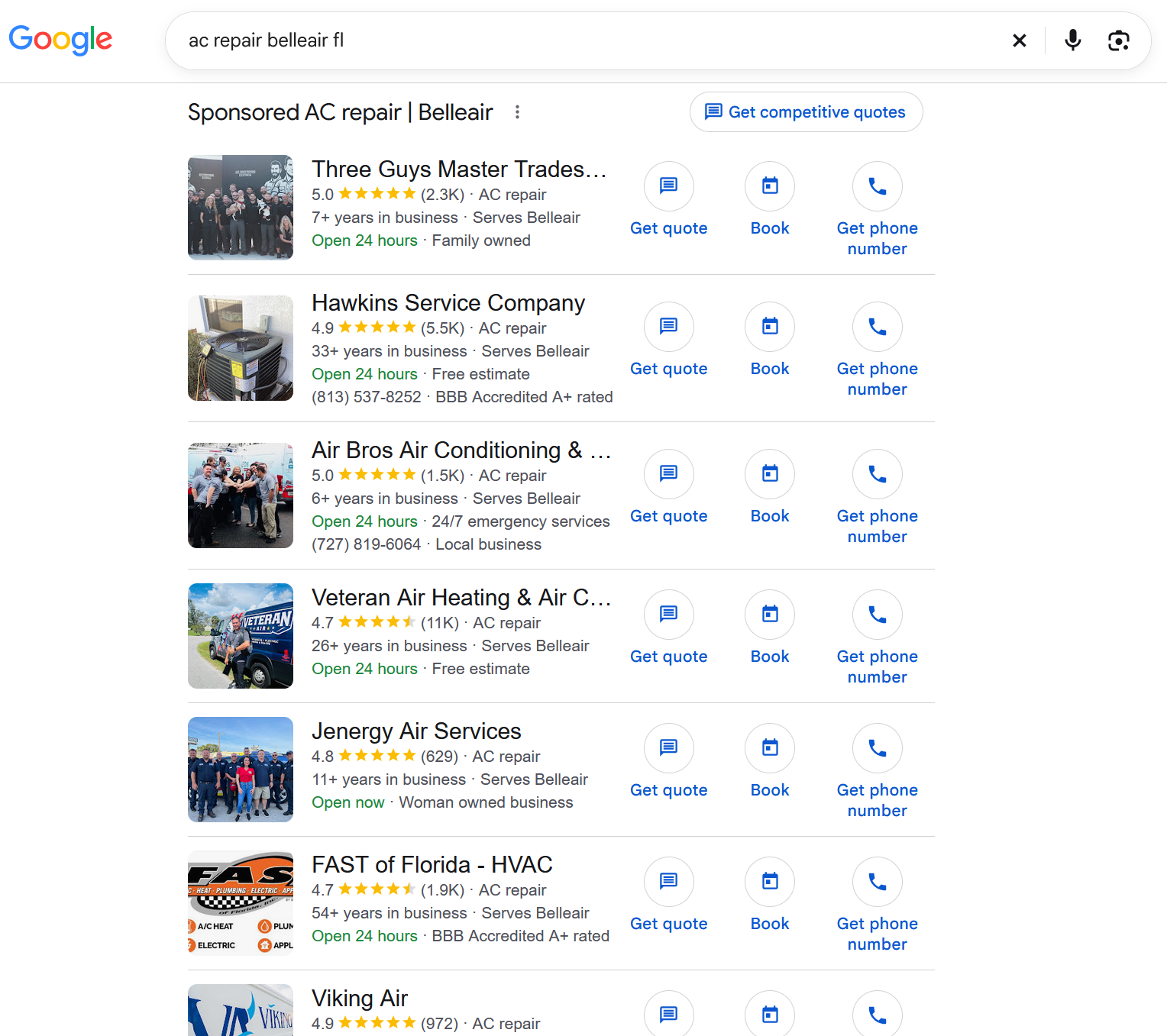
Belleair, FL
The Google Verified badge (formerly Google Guaranteed)
Before October 2025, LSA businesses displayed a "Google Guaranteed" badge that included a consumer money-back guarantee of up to $2,000 for unsatisfactory service. In October 2025, Google consolidated all trust badges into a single Google Verified blue checkmark and discontinued the financial guarantee in November 2025.
The badge now indicates that the business has passed Google's background check, license verification, and insurance verification. There is no Google-backed reimbursement for consumers.
The change has had minimal impact on LSA performance. Most consumers were not aware the money-back guarantee existed. Reviews, response time, and photos are the primary trust signals that drive consumer choice.
The badge may not appear on every single search result — Google displays it dynamically based on when it is most likely to influence a searcher's decision. Seeing a listing without the badge on occasion is normal and does not indicate a problem with the account.
Any existing marketing materials that reference "Google Guaranteed" or the $2,000 money-back guarantee should be updated to "Google Verified."
How LSAs compare to other paid channels
| Local Services Ads | Google Ads (PPC) | Angi / HomeAdvisor | |
|---|---|---|---|
| Payment model | Per lead (exclusive) | Per click | Per lead (shared with 3-8 contractors) |
| Average HVAC cost per lead | $51 | $104-$153 | $45-$100 |
| Appointment booking rate | 43.9% | ~12% | 15-22% (shared leads) |
| Cost per paying customer | ~$233 | $300-$400 | $250-$500+ |
| Ad position | Top of search | Below LSAs | Separate platform |
LSA benchmarks: PushLeads 2026, 888 contractors, 126,650 leads. Angi rates reflect shared-lead model — each lead is sent to multiple contractors simultaneously, which reduces close rates and increases effective cost per job.
Is LSA the Right Fit?
LSAs work best when these conditions are in place:
Minimum requirements:
- Active state HVAC contractor license
- General liability insurance and professional liability insurance (Google requires both for the HVAC category)
- Workers compensation insurance (if any employees)
- EPA 608 certification
- Verified Google Business Profile with real photos and current information
- Ability to answer incoming calls and messages quickly (under 5 minutes is the target)
When LSAs deliver the strongest returns:
- Strong review profile (4.5+ stars, 50+ reviews — the higher the better)
- Capacity to handle additional call volume without long hold times
- Willingness to answer or route after-hours calls (after-hours leads close at 80-90% vs 50-65% daytime)
- Commitment to a weekly lead review routine
When to wait:
- No Google Business Profile set up yet — GBP is a prerequisite for LSAs
- Fewer than 20 reviews — ranking will be difficult against established competitors. Build the review base first.
- No one available to answer phone calls promptly — slow response time damages ranking and wastes budget on leads that don't convert
- License or insurance issues that need to be resolved first — Google verifies both during the application process
Preparing to Apply
Gathering all documents before starting the application means the 3-4 week approval clock starts on day one instead of resetting with each missing document. Without preparation, the process can stretch to 6-8 weeks.
Documents to gather
| Document | Where to get it | Notes |
|---|---|---|
| State HVAC contractor license | State licensing board (FL: myfloridalicense.com) | Must be current and in good standing |
| EPA 608 certification | Issuing organization or EPA records | Required for HVAC category |
| General liability insurance COI | Insurance broker | Certificate of insurance showing active GL coverage |
| Professional liability insurance COI | Insurance broker | Google requires this in addition to GL for the HVAC category |
| Workers compensation insurance COI | Insurance broker | Required if any employees exist |
| Business registration / entity docs | State corporations division (FL: sunbiz.org) | LLC articles, corp docs, or sole prop registration |
| Owner government-issued photo ID | — | Used for identity verification through Evident (a Google partner) |
D-U-N-S number: Google uses Dun & Bradstreet to verify business entities. A D-U-N-S number is a unique 9-digit business identifier — think of it as a credit score ID for the business, not a person. Most small HVAC companies don't have one yet. It's free to obtain at dnb.com, but the application can take up to 30 days. Check whether the business already has one first, and if not, apply early — this can be the longest single step if it's not already in place.
Google Business Profile (GBP) prerequisites
The Google Business Profile must be verified and complete before the LSA application begins. LSAs pull from GBP, so it serves as the foundation.
- All HVAC service categories listed
- Business hours accurate (including after-hours if using an answering service)
- Real photos of the team, trucks, and completed jobs — not stock photography
- Service area configured to match actual coverage
- Contact information current
Insurance notes
Google requires both general liability and professional liability insurance for the HVAC category, but does not publish specific dollar minimums. The requirement is described as "enough to cover your business." In practice, standard HVAC industry coverage — $1M per occurrence / $2M aggregate for general liability — meets all known thresholds across every market. Any HVAC contractor already carrying standard industry-level coverage is likely covered without changes.
Commercial auto insurance is not required by Google for LSAs.
Background check preparation
HVAC is classified as an "urgent" category in Google's system, which triggers an additional level of screening. Background checks are required for:
- Every business owner listed on the business entity
- Every field worker — technicians, contractors, subcontractors, or anyone else who performs services at customer properties
- Not required for office staff, dispatchers, customer service representatives, or anyone who does not go to customer sites
Background checks cover identity verification and criminal history. They include cross-checks against national sex offender, terrorist, and sanctions registries, as well as company-level civil litigation history (judgments and liens). They do not include credit checks.
Google uses two third-party partners to run these checks:
- Pinkerton Consulting and Investigations handles criminal history and identity screening
- Evident handles government-issued photo ID verification
There is no need to contact either company directly. Once the application is submitted, Pinkerton and Evident reach out to each person being checked with instructions for completing their portion. The only time to contact Pinkerton is after a denial, to dispute factual errors in the background check results.
Google does not disclose the criminal history lookback period. Standard industry practice for similar screening programs is 7 years, but this is not confirmed for LSA specifically.
Timeline: Owner background check takes 3-7 business days. Field worker checks scale with the number of employees — a single technician is typically under a week, while a team of 5-10 can take up to 4 weeks.
Background checks are the single longest step in the approval process and run in parallel with everything else. Starting them on day one keeps the rest of the timeline on track.
Payment setup
Google bills for LSA leads automatically. During registration, a credit card or bank account is provided. Charges accrue as leads come in and are billed either every 30 days or when spending reaches a payment threshold — whichever comes first.
Payment thresholds start low (around $50) and increase gradually as the account builds history (e.g., $50 → $200 → $350 → $500). Monthly spending is controlled through the budget setting, not the payment threshold.
If a Google Ads account already exists, LSA can reuse the same payment method. A Google Ads account is not required to start — a Google account (Gmail) is sufficient, and the signup process creates what's needed.
Application Walkthrough
Step 1: Create the profile
Go to ads.google.com/local-services-ads and start a new profile. A Google account (Gmail) is required. If a Google Ads account doesn't already exist, one will be created during this process. Basic business information — name, address, phone number, service area — is entered here.
Step 2: Select job types
Enable every HVAC service that will actually be accepted when a call comes in:
- AC repair
- AC installation / replacement
- Heating repair
- Heating installation
- HVAC maintenance / tune-up
- Duct cleaning
- Heat pump installation and repair
- Emergency AC / heating service
- Thermostat installation
- Indoor air quality
Companies receiving 30+ leads per week typically have all available job types enabled. The more job types enabled, the more searches the ad is eligible to appear in.
Only enable services that will be accepted when the phone rings. Enabling a service and then declining those callers signals Google to show the ad less often — the net effect is worse than not enabling that service.
Step 3: Upload documentation
Upload all documents gathered in the preparation phase. Use clear photos or scans — blurry or partial documents cause verification delays.
Step 4: Initiate background checks
The application will prompt for owner information and field worker details to begin background checks. After submission, Pinkerton and Evident reach out directly to each person being checked with instructions — there is nothing else to do except make sure everyone responds promptly, as delays on their end extend the overall timeline.
Step 5: Connect Google Business Profile
Link the existing GBP to the LSA profile. Google verifies ownership — this step is typically completed within 24 hours.
Step 6: Set the initial budget
Start with $400-$800 per week. This typically generates 10-15 leads at current HVAC cost-per-lead rates. The budget can be adjusted at any time based on capacity and results. See Section 9 for seasonal budget strategy and ROI benchmarks.
Budget is set as a weekly amount. Google may spend more on some days and less on others but stays within the weekly total. Note: as part of the 2026 Performance Max migration, budgets are converting to daily averages — see Section 11 for details.
Step 7: Set business hours
Configure hours to match actual answering availability. If an answering service covers nights and weekends, set hours to include that coverage.
Google prioritizes businesses that are open at the time of search. For emergency HVAC calls at 10 PM or 2 AM, businesses showing 24/7 availability rank above those with standard business hours — all other factors being equal.
Unanswered calls during posted business hours count against responsiveness, which directly impacts ranking.
Step 8: Add photos
Upload real photos of the team, trucks, equipment, and completed work. Google penalizes stock photography. Photos build trust with searchers who are deciding between providers.
What to Expect During Screening
Once the application is submitted, the four verification areas described in Section 3 (business entity, owner background, field worker background, license/insurance) run simultaneously. There is nothing to do during this period except respond to any requests from Pinkerton or Evident — they reach out directly to each person being checked.
Total timeline
The typical end-to-end approval takes 3-4 weeks assuming all documents were ready when the application started. The background check for field workers is almost always the longest phase.
Some advertisers may qualify for an accelerated path — badge issued quickly with 14 days to complete remaining verification steps. Availability varies by category and market.
If an application is denied
Contact Pinkerton directly to identify and dispute any factual errors in the background check results. Google does not handle these disputes — they route through the screening partner.
- After a first denial: 30-day waiting period before reapplication
- After a second denial: 180-day waiting period
Google does not publish a specific list of disqualifying criminal offenses beyond sex offender and terrorist/sanctions registry matches. Criminal history results are evaluated, but the exact thresholds are not disclosed.
Annual renewal
Background checks and insurance verification must be renewed every year. If verification lapses, ads pause automatically and the Google Verified badge is removed until re-verification completes. Set a calendar reminder 60 days before the anniversary date to start the renewal process.
First 30 Days
Week 1: Ads go live
Once verification completes, ads begin appearing in search results. The first few days are a calibration period — Google's system is learning which searches to match to the profile.
- Confirm the phone number routing is working (test it by calling). Google assigns a local tracking number that forwards to the business phone. When someone calls through the LSA, the caller ID shows Google's tracking number, not the customer's direct number. Callers can reach back on that same tracking number for up to two weeks without generating a new charge.
- Verify the profile appears correctly in search results (search for a relevant term from within the service area)
- Make sure whoever answers the phone knows LSA calls are coming and how to identify them. The caller ID will show an unfamiliar local number. Dispatchers and front desk staff need to know not to screen or ignore these calls — every missed or declined LSA call counts against the account's responsiveness score.
Week 2-3: Monitor lead quality
Not every lead will be a good fit. Common issues in the first few weeks:
- Calls for services not offered (customer confusion)
- Spam or robocalls
- Wrong numbers
- Duplicate calls from the same customer
Rate every lead in the dashboard. Go to the Leads section, click "Rate this lead," and provide feedback. This trains the automated system and triggers credit reviews for low-quality leads. More on this in Section 8.
Handling message leads
LSAs generate both phone calls and text-based message leads. Messages appear in the LSA dashboard (or the Google Ads Leads section post-migration). Response time matters for messages too — aim to respond within 4 hours. Phone calls tend to convert at a higher rate than messages because the customer is already speaking with someone, but messages still generate bookable leads and are charged the same way.
Week 4: First performance review
After 3-4 weeks of data, review these metrics:
| Metric | What to look for | Healthy benchmark |
|---|---|---|
| Cost per lead | Are leads within expected range? | $25-$75 depending on season and market |
| Booking rate | What percentage of leads became jobs? | 40%+ is strong |
| Response time | How fast are calls being answered? | Under 5 minutes |
| Lead quality | What percentage are spam/wrong number? | Less than 25% |
| Budget utilization | Is the budget running out early? | Budget should last through business hours |
The $51 industry average is a year-round blended figure. During peak summer months, expect $60-$120 per lead. During shoulder seasons, $25-$55. The seasonal breakdown is in Section 9.
Adjust budget based on capacity. If leads are converting well and there's technician availability, increase spend. If leads are low quality, review job type and service area settings before changing budget.
How Ranking Works
LSA ranking determines which businesses appear in positions 1-3 for any given search. Unlike Google Ads, there is no keyword bidding — ranking is determined by a combination of business signals.
Google does not publish official ranking weights. The following is based on consistent patterns observed across practitioner data and Google's own documentation:
Ranking factors
| Factor | Impact | What it means | Target |
|---|---|---|---|
| Reviews | Highest (~35-40%) | Star rating, total count, and how recently reviews were posted. A company with 80 reviews getting 2-3 per week consistently outranks a company with 200 reviews and nothing new in 3 months. | 4.8+ stars, 100+ total reviews, 5-10 new reviews per month |
| Response time | Very high (~20-25%) | How quickly incoming calls and messages are answered. Google measures this down to the minute. | Under 5 minutes. Each additional 25 minutes reduces conversion likelihood by approximately 8x. |
| Missed call rate | Very high | Percentage of calls that go unanswered during posted business hours. | Below 5%. Above this threshold, ranking suffers significantly. |
| Call quality | High (~15-20%) | Google routes every LSA call through a tracking number and uses AI to analyze the conversation — whether the lead was booked, whether services matched the request, and the overall quality of the interaction. | Book or properly route every call. Every declined lead reduces future ad frequency. |
| Job type coverage | High | How many service types are enabled. More types = more searches the ad is eligible for. | Enable all genuinely offered services. Do not enable services that will be declined. |
| Profile completeness | Medium-high (~10-15%) | All sections filled out — license/insurance docs, service descriptions, accurate hours, service area, multiple real photos. | 100% complete. No empty sections. |
| Business hours | Medium | Businesses open at the time of search rank higher than those that are closed. | Match hours to actual availability. 24/7 or extended hours (via answering service) provides a ranking advantage for evening and weekend emergency searches. |
| Proximity | Medium (~10-15%) | Distance between the business location and the searcher. Closer businesses rank higher. | Not controllable — but service area configuration should match actual coverage. Overly broad areas dilute ranking. |
| Budget | Gatekeeper | Insufficient budget means ads stop showing partway through the day while competitors continue appearing. | Budget must be enough to maintain visibility through all posted business hours. Running out at 2 PM means missing afternoon and evening searches entirely. |
The call analysis factor
This is worth understanding in detail because it's not visible in any dashboard. Google records and analyzes every LSA call using AI. The system evaluates:
- Whether the caller's need matched the services offered
- Whether the lead was booked or turned away
- The professionalism and quality of the interaction
- Whether the call reached a live person or went to voicemail
This means investing in phone handling training for the front desk pays off in ranking, not just customer experience. Consistent call quality is as important to LSA performance as the budget and review strategy.
Building reviews
Reviews are the single most impactful ranking factor. For businesses below 100 reviews, building review volume is the highest-leverage activity for improving LSA ranking. Effective approaches:
- Ask satisfied customers for a review at the end of every completed job — the closer to the moment of satisfaction, the higher the response rate
- Send a follow-up text or email with a direct link to the Google review page within a few hours of job completion
- Respond to every review within 24 hours — positive and negative. Review responses are a ranking signal, and unanswered reviews (especially negative ones) reduce both ranking and the trust that potential customers feel when reading the profile.
- Focus on consistency over volume spikes. A steady flow of 2-3 reviews per week outperforms 20 reviews in one month followed by silence.
Managing Leads and Credits
How the credit system works
Google uses an automated machine-learning system to assess lead quality. This replaced the manual dispute process (formerly called "lead disputes") that was available before mid-2024.
Stage 1 — Initial screening: When a lead comes in, Google's system assesses quality in real time. Leads determined to be invalid or low-quality at this stage are not charged.
Stage 2 — Post-charge reassessment: Leads that were initially charged are reassessed by the system over the following days. If later determined to be low-quality, an automatic credit is applied to the account. Credits typically appear within 30 days.
Stage 3 — Manual feedback: The automated system catches most spam and robocalls, but it doesn't catch everything. The remaining tool for flagging bad leads is the "Rate this lead" feature.
How to rate leads
- Go to the Leads section in the dashboard
- Find the lead to rate
- Click "Rate this lead"
- Select "Dissatisfied" or "Very dissatisfied"
- Choose a reason from the dropdown — spam, solicitation, wrong number, etc.
This is the only manual way to trigger a credit review. Selecting "Dissatisfied" flags the lead for the automated system to reconsider.
What qualifies for credits
| Lead type | Credit eligible? | Notes |
|---|---|---|
| Spam or robocall | Yes (usually automatic) | The automated system catches most of these |
| Wrong number | Yes | Rate as dissatisfied with reason |
| Solicitation (sales call) | Yes | Rate as dissatisfied with reason |
| Duplicate lead (same customer, same issue) | Yes (usually automatic) | System detects repeat contacts |
| Job type not serviced | No | This credit category was removed. Keep job types accurately configured. |
| Geographic area not serviced | No | This credit category was removed. Keep service area accurately configured. |
Deadlines and routine
- 30-day window: Feedback submitted more than 30 days after a lead is not considered. Rate leads promptly.
- Weekly routine: Set aside 15-20 minutes each week to review all leads from the past 7 days. Rate any that were spam, solicitation, wrong numbers, or duplicates.
- Revenue impact: Industry data suggests 15-25% of LSA leads are low-quality. At a spend of $400-$800 per week, consistent lead rating can recover $3,000-$10,000 annually in credits that would otherwise be lost.
Budget and ROI
Cost per lead by season
HVAC lead costs vary with demand. The $51 industry average (see Section 1 comparison table) is a year-round blended figure. Actual costs are higher in peak months and lower in shoulder seasons:
| Season | CPL range | Lead volume | Strategy |
|---|---|---|---|
| Summer (Jun-Aug) | $60-$120 | Very high | Maximum capture — highest revenue potential |
| Winter (Dec-Feb) | $45-$90 | High | Strong demand for heating; slightly less competitive than summer |
| Spring (Mar-May) | $25-$50 | Moderate | Pre-season ramp — build ranking before summer competition |
| Fall (Sep-Nov) | $25-$55 | Moderate | Maintain ranking; focus on maintenance plan sign-ups |
Seasonal budget framework
| Period | Weekly budget | Purpose |
|---|---|---|
| Pre-season ramp (May, Oct) | $600-$900 | Increase spend before peak to build ranking ahead of competitors |
| Peak season (Jun-Aug, Dec-Feb) | $800-$1,500+ | Maximum lead volume when demand and revenue are highest |
| Shoulder season (Mar-Apr, Sep) | $250-$400 | Maintain ranking position and review velocity at lower cost |
ROI benchmarks
Industry data from PushLeads (2026, 888 contractors, 126,650 leads):
| Metric | Value |
|---|---|
| Average cost per lead (HVAC) | $51 |
| Appointment booking rate | 43.9% |
| Effective close rate (leads that become paying customers) | ~22% |
| Average cost per paying customer | $233 |
| Average ticket value | $1,826 |
| Return on ad spend (closed jobs) | 7.84x |
| LSA CPL vs Google Ads (blended) | ~49% cheaper |
| LSA CPL vs non-branded Google Ads | ~64% cheaper |
ROI calculation
The formula:
Example at $2,400/month spend ($600/week):
- $2,400 / $51 = ~47 leads
- 47 x 22% = ~10 paying customers
- 10 x $1,826 average ticket = ~$18,260 revenue
- ROAS: ~7.6x
This aligns with the 7.84x ROAS from the benchmark data. The actual return depends on the mix of repair vs. replacement jobs — replacement jobs ($5,000-$12,000+) dramatically increase ROAS when they come through LSAs.
When to scale up or pull back
Scale up when:
- Booking rate is above 35% and there is technician capacity for more calls
- Budget is running out before the end of the business day (missing leads)
- Peak season is approaching (increase 2-4 weeks before demand spikes)
Pull back when:
- Booking rate drops below 25% (investigate lead quality or phone handling before cutting budget)
- Technician capacity is maxed — paying for leads that can't be served wastes money and hurts ranking (unanswered/declined calls)
- Shoulder season arrives and demand naturally decreases
Ongoing Operations
Weekly tasks
| Task | Time | Purpose |
|---|---|---|
| Review and rate all new leads | 15-20 min | Recover credits for bad leads; train the automated system |
| Check response time metrics | 5 min | Verify calls are being answered within 5 minutes |
| Monitor budget utilization | 5 min | Confirm budget lasts through all business hours |
Monthly tasks
| Task | Purpose |
|---|---|
| Review CPL and booking rate | Identify trends; compare to seasonal benchmarks |
| Audit job types and service area | Remove services no longer offered; adjust area if expansion or contraction |
| Review competitor positioning | Search from different locations within the service area to see ranking |
| Update photos | Fresh job photos keep the profile current |
Annual tasks
| Task | Deadline | Consequence of missing |
|---|---|---|
| Renew background checks | Anniversary of original verification | Ads pause; Google Verified badge removed |
| Update insurance COIs | Before policy expiration date | Ads pause; badge removed |
| Update contractor license | Before license expiration | Ads pause; badge removed |
Set calendar reminders 60 days before each renewal deadline. The renewal process takes 3-4 weeks, the same as the original verification.
Planning for business changes
Certain changes trigger re-verification, which can pause ads for 24-48 hours:
- Changing the business name
- Changing the business address (office move)
- Adding a new location (requires a separate business entity check per location)
Plan these changes during shoulder season if possible, and avoid making them during peak weeks when ad downtime has the highest cost.
Performance Max Migration (2026)
As of August 2026, Google is migrating all Local Services Ads into Google Ads as Performance Max campaigns with pay-per-lead goals. Performance Max is Google's AI-driven campaign type that automates bidding, targeting, and placement — it replaces the standalone LSA dashboard with Google Ads as the management interface.
This is the largest operational change to LSAs since the platform launched.
HVAC is in the first migration wave, alongside plumbing, electrical, appliance repair, house cleaning, lawn care, roofing, pest control, and moving.
If setting up LSA for the first time after August 2026, the account may start directly in the Performance Max system rather than the standalone LSA dashboard. The setup process, verification, and ad placements are the same — the difference is where the campaign is managed afterward. The pre-migration action items below are for businesses that had an active LSA account before the transition.
Migration timeline
| Phase | Timing | Who |
|---|---|---|
| First wave | August 2026 | HVAC, plumbing, electrical, appliance repair, house cleaning, lawn care, roofing, pest control, moving (US) |
| Second wave | Late 2026 | Service-area businesses without storefronts; accounts with custom bidding or booking configurations |
| Third wave | 2027 | Non-US accounts and all remaining categories |
Account administrators receive an email notification 14 days before their account migrates, followed by a reminder at 7 days.
What stays the same
- Pay-per-lead pricing — still paying for leads, not clicks
- Ad positions — same placements on Google Search and Google Maps
- No keywords — targeting is still based on service categories and service area, not keyword bidding
- Google Verified badge — carries over automatically
- Lead history — past leads, contact details, message history, and call recordings all transfer to the new system
What changes
| Feature | Before (standalone LSA) | After (Performance Max) |
|---|---|---|
| Management dashboard | Separate LSA interface at ads.google.com/localservices | Google Ads interface |
| Budget structure | Weekly budget | Daily average (previous weekly budget / 7); monthly cap = daily x 30.4 |
| Bid controls | Manual max cost-per-lead available | Manual bidding eliminated — automatic bidding only |
| Cost-per-lead targets | Different targets per service category (e.g., separate targets for repair vs. installation) | Single campaign-level target (called CPA — cost per acquisition) across all categories |
| BBB callouts | Better Business Bureau rating displayed alongside the ad | Discontinued — replace with up to 6 structured callouts (specialties, payment methods, hours, certifications, etc.) |
| Historical performance data | Available in LSA dashboard | Does not transfer. Must be exported before migration. |
| Business detail changes | Edited directly in LSA | Business name and address changes made in Google Business Profile; sync to Google Ads automatically |
| Phone number routing | Set in LSA | Editable in real-time within Google Ads |
The service category cost target issue
This is the most operationally significant change. Before migration, a business running both AC repair and AC installation under one campaign could set different cost-per-lead targets for each — recognizing that a $350 repair job and an $8,000 installation job have very different economics.
After migration, a single campaign-level cost target covers all service categories within that campaign. A business running multiple service lines with different ticket values and margins under one campaign loses the ability to set different targets for each.
The solution: create separate campaigns per service category. AC repair in one campaign with its own cost target, installation in another. This requires more active management but preserves the ability to optimize spend by service line.
Before migration — action items
Complete these before the 14-day migration notice arrives:
- Export historical performance data. Download reports covering impressions, spend, and cost-per-lead by service category. This data does not transfer. Screenshots are a backup if reports aren't available.
- Document current bidding settings. Screenshot any manual bid ceilings and per-category cost targets.
- Record lead quality metrics. Note current booking rates, close rates, and lead quality percentages by service line.
- Save campaign configuration. Record service areas, categories, ad schedules, lead-routing phone numbers, photos, and callouts.
- Plan campaign structure. If running multiple service categories with different economics, plan how to split them into separate campaigns post-migration.
- Prepare replacement callouts. Better Business Bureau callouts are discontinued. Prepare up to 6 structured callouts to replace them (business hours, specialties, payment methods, certifications, service guarantees, etc.).
After migration
- Allow up to two weeks for campaign performance to stabilize.
- Verify that the daily budget calculation matches the intended spend (previous weekly amount / 7).
- Confirm service areas, categories, and ad schedules transferred correctly.
- Validate that the lead-routing phone number is working.
- Check that the Google Verified badge is displaying.
- Compare early performance against the baseline data saved before migration.
Support
Google has a dedicated migration support line: +1-844-205-0011, Monday-Friday, 9 AM-8 PM EST. (As of September 2026.)
Troubleshooting
Ads paused unexpectedly
| Possible cause | How to check | Resolution |
|---|---|---|
| Insurance verification lapsed | Check verification status in the dashboard | Upload current COI; re-verification takes 1-2 weeks |
| Background check renewal overdue | Check verification status | Initiate renewal; 3-7 business days for owner, longer for field workers |
| Contractor license expired | Check state licensing board for license status | Renew license; upload updated documentation |
| Google Business Profile issue | Check GBP for warnings or suspensions | Resolve the GBP issue first — LSAs depend on it |
| Budget exhausted | Check daily spend | Increase budget or narrow service area/hours |
| Business name or address change | Changes trigger re-verification (24-48 hour pause) | Wait for re-verification to complete |
Ranking dropped
- Check response time. Has average response time increased? Even a shift from 3 minutes to 8 minutes can cause ranking loss.
- Check review velocity. Have new reviews slowed down? A gap of 2-3 weeks without new reviews can trigger ranking decline.
- Check missed call rate. Has it gone above 5%?
- Check competitor activity. Are new competitors running LSAs in the market? Search from multiple locations in the service area.
- Check budget. Is the daily budget running out before end of day? Competitors whose budget lasts longer capture the leads.
- Check job type settings. Were any enabled services removed? Has the service area been narrowed?
Leads declining in quality
- Review job types enabled — disable any that consistently generate irrelevant calls
- Review service area — overly broad areas can attract calls from locations that are too far to serve efficiently
- Rate every low-quality lead in the dashboard — this trains the automated system to filter better
- Check if competitors are running aggressive promotions that are attracting the higher-quality leads
Budget running out before end of day
This means leads are being missed during afternoon and evening hours. Options:
- Increase weekly/daily budget
- Narrow service area to reduce competition for each search
- Shift business hours to cover only the highest-converting time periods
- Review whether all enabled job types are generating positive ROI — disable any that are consuming budget without converting
Getting Started Checklist
For quick reference — every item needed to go from zero to running LSAs:
Before applying:
- Google account (Gmail) created
- Google Business Profile verified and complete (photos, hours, services, service area)
- State HVAC contractor license — current and in good standing
- EPA 608 certification
- General liability insurance COI
- Professional liability insurance COI
- Workers compensation insurance COI (if employees)
- Business registration documents
- Owner government-issued photo ID
- D-U-N-S number (check dnb.com — apply early if not registered)
- Credit card or bank account for billing
- List of all field workers who will need background checks (names, contact info)
- Real photos of team, trucks, and completed jobs
During application:
- Profile created at ads.google.com/local-services-ads
- All HVAC job types enabled (only services that will be accepted)
- All documentation uploaded
- Background checks initiated for owner and all field workers
- GBP linked to LSA profile
- Budget set ($400-$800/week to start)
- Business hours configured to match actual answering availability
- Photos uploaded
After approval:
- Test phone routing (call the tracking number)
- Verify profile appears in search results
- Brief dispatchers/front desk on LSA calls (unfamiliar caller ID)
- Set calendar reminders for annual renewal (60 days before anniversary)
- Schedule weekly lead review routine (15-20 minutes)
Sources (17)
- Google Support — Business Screening and Verification Requirements (US)
- Google Support — Screening and Verification Process
- Google Support — How Providers Qualify
- Google Support — Automated Lead Credits
- Google Support — How to Pay for Local Services Ads
- Google Ads Support — LSA to Performance Max Transition
- PushLeads — Google Verified Badge for Contractors 2026 (888 contractors, 126K leads)
- Boomcycle — LSA Ranking Factors 2026
- Footbridge Media — 5 LSA Changes Contractors Should Know
- HVAC SEO Agency — Google LSA for HVAC Complete Guide 2026
- TweakedSEM — Google LSA Background Checks Guide
- Location3 — Google Is Retiring the Google Guarantee for LSA
- Local Splash — Google Verified: What the New Badge Means
- ALM Corp — LSA Requirements Update July 2026
- ABC17 — What to Save Before Your LSA Account Migrates
- Search Engine Journal — Google Is Bringing LSA Into Google Ads
- Bunker — Google Guaranteed Insurance Requirements